How to Photograph the Milky Way Core from a Bortle 4 Site with a Kit
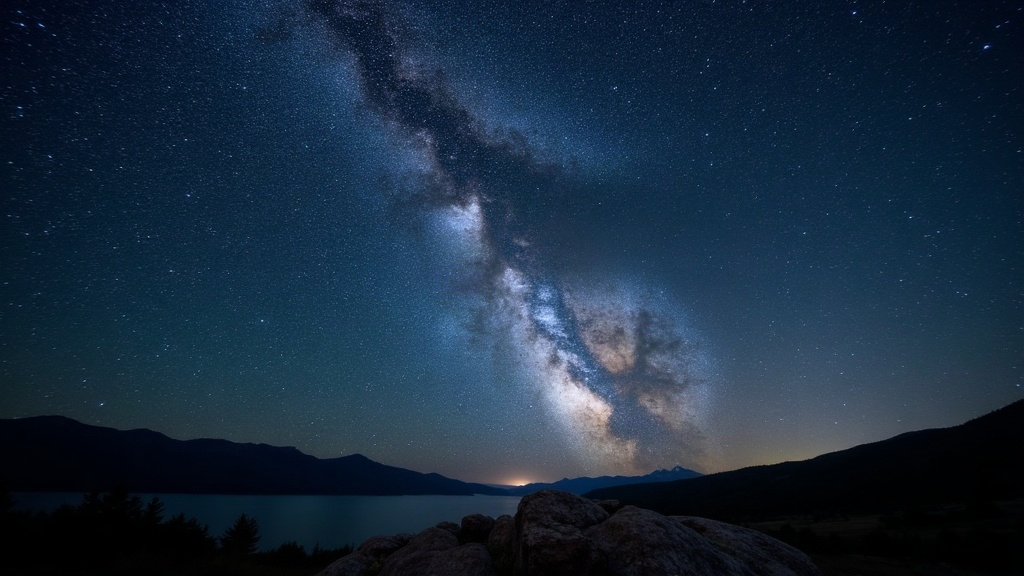
You don’t need a $2,000 wide-angle prime to catch the Milky Way core. A standard kit lens (something like an 18-55mm f/3.5-5.6) can produce surprisingly detailed, shareable results if you shoot from a Bortle 4 site and get your technique right. This guide covers exactly how, from timing and settings to processing, using gear most beginners already have sitting in a camera bag.
Why Bortle 4 Is the Sweet Spot for Kit Lens Shooters
Bortle 4 skies (those rural-to-suburban transition zones) are dark enough to reveal the galactic core’s structure, yet close enough that you don’t need a four-hour drive to reach them. At this level of darkness, the Milky Way shows up to the naked eye as a faint band across the sky. A kit lens, despite its modest maximum aperture, can still pull in enough light during a well-exposed shot to capture real, usable detail.
Shooting from Bortle 4 rather than Bortle 1-2 means a few practical things:
- You won’t need to stack dozens of frames just to beat down noise
- Light pollution gradients are manageable with basic gradient removal in post
- You can wrap a shoot in an hour or two, which matters a lot when you’re still learning the ropes
Gear Checklist (No Upgrades Required)
- Camera with manual mode (any modern DSLR or mirrorless will do)
- Kit lens, set to its widest focal length (usually 18mm on APS-C bodies)
- Sturdy tripod. Honestly, this matters more than the lens itself
- Intervalometer or a 2-second self-timer to kill shake
- Red headlamp and a fully charged battery (cold nights eat batteries fast, bring a spare if you have one)
When to Shoot: Timing Is Everything
The Milky Way core (the bright, dense center of our galaxy) only shows up during certain months and hours, and that window shifts depending on your hemisphere.
- Northern Hemisphere: Core season runs roughly March through October, with the best mix of core height and darkness falling in May through July, once astronomical twilight ends and before the moon rises.
- Check moon phase: Try to shoot within 3-4 days of a new moon. A bright moon will wash out faint core detail even under a Bortle 4 sky.
- Use an app: Stellarium or PhotoPills will tell you the core’s exact azimuth and altitude for your location and date, no guesswork needed.
Camera Settings for a Kit Lens
Since kit lenses top out around f/3.5, you’ll need to lean on exposure time and ISO to make up the difference, not aperture alone.
- Aperture: Wide open, so f/3.5 at 18mm
- Shutter speed: Use the “500 rule,” adjusted for crop sensors: 500 ÷ (focal length × crop factor). For an 18mm lens on an APS-C body (1.5x crop), that works out to roughly 500 ÷ 27 ≈ 18 seconds before stars start trailing into little streaks.
- ISO: Start at ISO 3200. Bortle 4 skies usually tolerate this without turning your shadows into mush; push to 6400 only if your camera handles high ISO reasonably well.
- Focus: Manual, set to infinity. Zoom in on a bright star in Live View to fine-tune it. Autofocus simply won’t lock onto anything in the dark, so don’t bother trying.
- Shoot in RAW: Not optional. JPEG compression throws away the shadow detail you’ll need later in editing.
Framing and Composition
A kit lens has a narrower field of view than a true wide-angle, so you’ll capture less sky overall, which means composition carries more weight:
- Include a foreground anchor, like a tree, a rock formation, or a cabin silhouette, to ground the shot and give it scale
- Shoot in portrait orientation if you want to show more of the core’s vertical structure
- Try a simple panorama: shoot 3-4 overlapping frames and stitch them together in post to widen your effective field of view without buying a new lens
Post-Processing Basics
- Lightroom/Darktable: Reduce noise first, luminance noise reduction around 40-60 is a good starting point, then boost clarity and dehaze moderately. Overdo the dehaze slider and you’ll end up with a fake, blotchy mess instead of a clean image.
- Gradient removal: A linear gradient tool tames the light pollution glow near the horizon, which shows up even at Bortle 4.
- White balance: Cool it down slightly, around 3800-4200K, to bring out the core’s natural blue-and-rust color contrast.
- Avoid oversharpening: Kit lens images already have soft corners. Aggressive sharpening just amplifies noise, not actual detail.
Common Mistakes to Avoid
- Shooting too soon after sunset, before the sky has reached full astronomical darkness
- Ignoring the moon phase, then wondering later why the core looks washed out and flat
- Relying on autofocus in the dark, which usually hands you a stack of soft, unusable frames
- Skipping the tripod and trying to handhold it “just to test,” which never actually works
Conclusion
Photographing the Milky Way core from a Bortle 4 site with nothing but a kit lens is entirely doable once you understand how timing, exposure, and basic processing work together. The dark sky does most of the heavy lifting here. Your job is just to dial in the settings, hold still, and shoot in RAW. Once you’ve got this foundational technique down, upgrading to a faster lens later will only sharpen results you already know how to capture.